
Your overview as the start page
Updates, security, health, conflicts, clean-up and inventory as tiles. Drag & drop to arrange, show or hide, pick a size – in Classic, Modern or Playful style.
Package manager hub for macOS
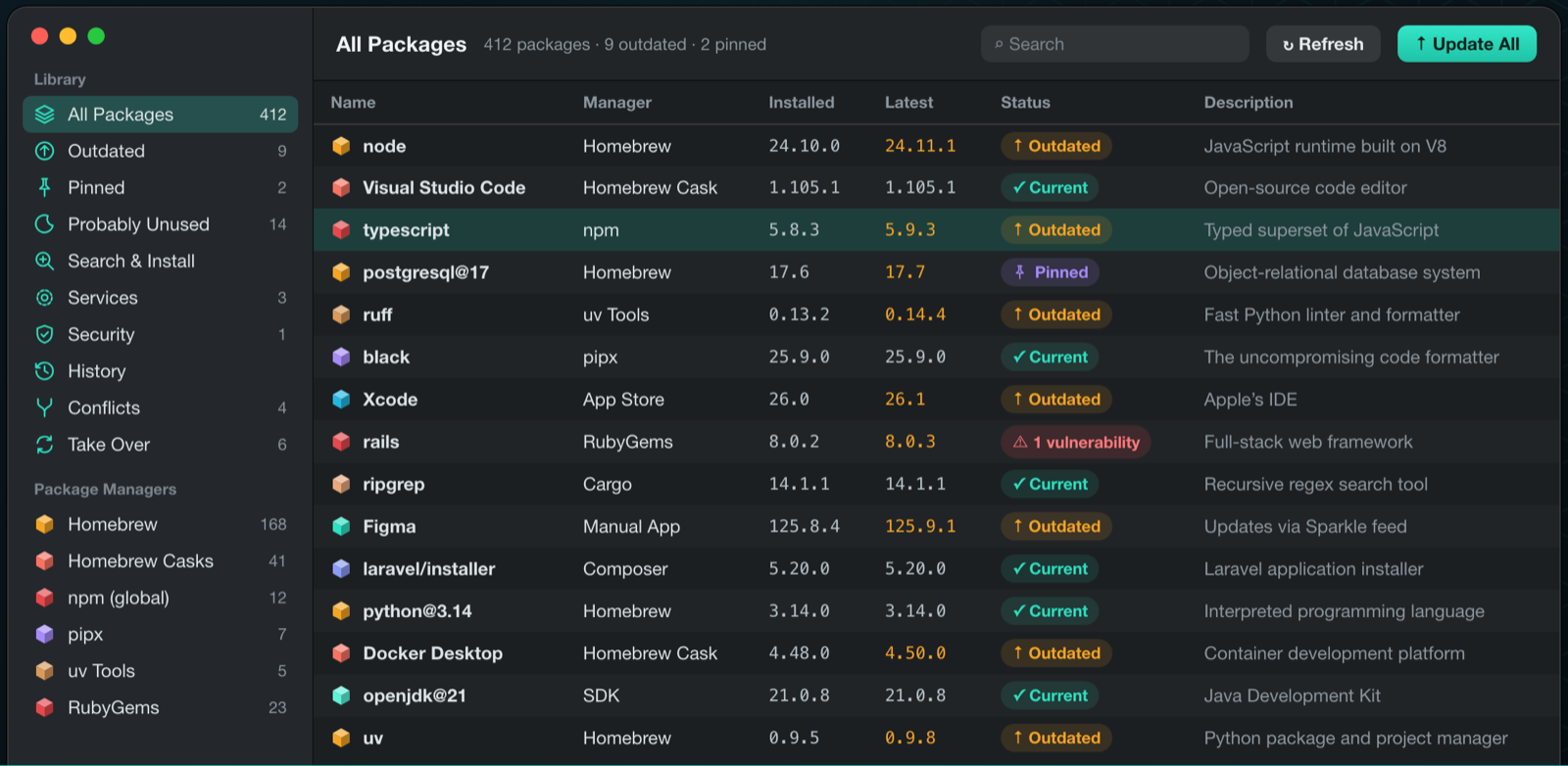
Homebrew, MacPorts, npm, pnpm, pip, Cargo, Go, VS Code extensions, the App Store, manually installed apps, SDKs and Docker images – in a single list, scanned in parallel, kept up to date with one click. A native SwiftUI app and a full command-line tool.
macOS 14 Sonoma or later · Apple Silicon & Intel · signed & notarized by Apple
Animated example output of the macpackmate command-line tool: scanning outdated packages, updating everything, PATH conflicts, rollback and a security audit.
New · 0.65.2
MacPackMate now opens with an overview you arrange yourself – and it cleans up, explains and compares more than ever.
Updates, security, health, conflicts, clean-up and inventory as tiles. Drag & drop to arrange, show or hide, pick a size – in Classic, Modern or Playful style.
Tools grouped into Packages, Clean up, Secure and Set up. Managers you don’t have stay collapsed.
See how much each package manager takes up and how much a clean-up frees – cache sizes right in the clean-up dialog.
MacPackMate finds what removed packages leave behind and moves it to the Trash if you want.
For the packages you trust: keep them current automatically, everything else stays in your hands.
A package’s dependency chain, all the way up to what you installed yourself.
Put the pack files of two Macs side by side and see at once what’s missing where.
Two Homebrews on one Mac? MacPackMate finds multiple installations and removes a manager cleanly.
See which licence a package uses, right in the app.
Now also checks how the managers are configured. MacPackMate runs the suggested commands itself – no more copying into Terminal.
Every confirmation shows clearly what will happen, which commands run and what can be undone.
Prefer the terminal? MacPackMate is also available as a cask:
❯ brew tap flo-murnig/tap && brew install --cask macpackmate
01 · Sources
25 package managers and 5 more install paths (apps, installer packages, loose programs, language versions & SDKs, Docker images) – everything that landed on your Mac through a package manager, an installer or by hand. A missing manager is shown faded – nothing has to be pre-installed, and MacPackMate can even install it for you.
02 · Tempo
All managers are asked at the same time (Swift concurrency). Total time is roughly that of the slowest one – not the sum. Try it:
Ready. Timings are a simulation.
03 · Flow
Scroll through a typical run – from scan to audit. The terminal follows along.
Step 1
One command asks all 30 sources at once: what is outdated, what is pinned? The list is there in seconds.
❯ macpackmate scan --outdated-only
MANAGER  NAME         VERSION   LATEST
brew     node         24.10.0   24.11.1  ↑
npm      typescript   5.8.3     5.9.3   ↑
uv       ruff         0.13.2    0.14.4  ↑
mas      Xcode        26.0      26.1    ↑
412 packages · 4 outdated · 2 pinned · 30 sources in parallel in 1.4 s
Step 2
“Update all” skips pinned and admin-only packages. Nothing happens behind your back.
❯ macpackmate update --all
⏺ Updating node (Homebrew)
  ⎿ $ brew upgrade node
⏺ Updating typescript (npm)
  ⎿ $ npm install --global typescript@latest
⏺ 3 updated · 1 skipped
  ⎿ ✓ brew:node  24.10.0 → 24.11.1
    – mas:Xcode: needs administrator rights
Step 3
Duplicate PATH entries and shadowed programs show up at once – with a fix, first as a --dry-run.
❯ macpackmate conflicts
python3 → /opt/homebrew/bin/python3 ✓
  shadowed: /usr/local/bin/python3 (python.org 3.8)
⚠ PATH: /usr/local/bin twice (~/.zshrc, line 12)
⎿ Fix: macpackmate conflicts fix path-dup-1 --dry-run
Step 4
The history knows every version before and after. rollback restores the previous one.
❯ macpackmate rollback npm:typescript
⏺ History: update 5.8.3 → 5.9.3
  ⎿ $ npm install --global typescript@5.8.3
✓ typescript 5.9.3 → 5.8.3 · saved to history
Step 5
Check against OSV.dev on demand – only names and versions leave your Mac. With an exit code for CI.
❯ macpackmate audit --fail-on high
⏺ Checking 287 packages against OSV.dev – names and versions only
  ⎿ ✗ HIGH rubygems:rails 8.0.2 → 8.0.3
exit code 5
04 · Core principles
What MacPackMate is made of at its core – and why you can trust it with access to your Mac.
--cli-firstThe app is display only. Every action runs through the embedded macpackmate tool and the app reads its JSON. Whatever you click, you can script.
App → macpackmate --json → Core--parallel30 sources scan simultaneously, not one after another. A live NDJSON log shows each step as it happens.
scan: 30 sources · 1.4 s--explicitOnly actions you start. Before uninstalling, MacPackMate asks what depends on it. --dry-run shows every plan first; pinned and admin-only packages are skipped by Update All.
uninstall brew:openssl@3 → blocked (3 dependents)--undoHistory records every action from app and terminal: versions before → after, command, full log. rollback builds on it; PATH fixes come with a backup and undo.
history show 42 · rollback npm:typescript--privateMacPackMate collects no personal data and sends nothing to the author. Admin rights only via sudo or the native macOS dialog. The security check runs only on demand – just package names and versions go to OSV.dev.
telemetry: none--inclusiveVoiceOver reads icons, status lights and warnings as words and announces every action's result. Full keyboard control, Reduce Motion respected. English and German in app, terminal and manual.
VoiceOver ✓ · Keyboard ✓ · DE/EN ✓The app deliberately does not link the logic. It launches the embedded CLI and decodes its output – every JSON output has a JSON Schema (2020-12) and stable exit codes. Great for CI, dotfiles and scripts, for example macpackmate audit --fail-on high.
05 · CLI
Every feature of the app is also a command. A selection – all example output:
search · installSearches Homebrew, MacPorts, npm, PyPI, RubyGems, crates.io, Packagist, Go modules (with the exact package path) and the App Store at once – exact matches first, installed ones marked.
❯ macpackmate search ripgrep
❯ macpackmate install brew:ripgrep --dry-run
brew   ripgrep   14.1.1  ★ exact
cargo  ripgrep   14.1.1  (installed)
port   ripgrep   14.1.1
⏺ dry-run: brew install ripgrep
versions · rollbackSee every version and switch – also back. After a bad update rollback is enough; with Homebrew you link major versions like node@22 into your PATH.
❯ macpackmate versions npm:typescript
❯ macpackmate install npm:typescript --version 5.8.3
5.9.3  latest
5.8.3  installed
5.8.2
…
⏺ npm install -g typescript@5.8.3
adoptHand-installed apps become Homebrew casks – with a prediction whether Homebrew will accept them. pip tools move to pipx or uv.
❯ macpackmate adoptable
❯ macpackmate adopt "app:/Applications/Cyberduck.app" --dry-run
app:Cyberduck  →  cask:cyberduck  ✓ Homebrew takes it
pip:black       →  pipx / uv
⏺ brew install --cask --adopt cyberduck
servicesHomebrew background services with a status light, on/off, restart and log view – PostgreSQL, MySQL, Redis and friends.
❯ macpackmate services
❯ macpackmate services restart postgresql@17
● postgresql@17  started
● redis          started
○ mysql          stopped
backup · restoreYour setup in one file – rebuilt on a new Mac in a sensible order, optionally with exact versions and pins.
❯ macpackmate export -o MacPackMate.json
❯ macpackmate import MacPackMate.json --dry-run
✓ 412 packages → MacPackMate.json
⏺ brew → cask → npm → pipx …
(right order, pins included)
managers · doctorThe package managers themselves stay current: version checks with a hint in the sidebar and menu bar, update-managers (⌥⌘U), and brew update runs before every update check. doctor checks their health (read-only); managers install installs missing ones from signed installers or via Homebrew.
❯ macpackmate update-managers
❯ macpackmate doctor
❯ macpackmate managers install go --dry-run
npm   11.20.0 → 12.2.2   ✓
brew update (before every update check)
⚠ brew doctor: 1 warning · pip check: ok
⏺ dry-run: brew install go
unusedFinds apps and tools unused for N days – via Spotlight, access times and shell history – biggest first.
❯ macpackmate unused --days 180
1.4 GB  Xcode Simulator Runtime  last used 412 d ago
612 MB  Docker Desktop         last used 231 d ago
… 14 candidates
All outputs are examples. All commands, exit codes and automation →
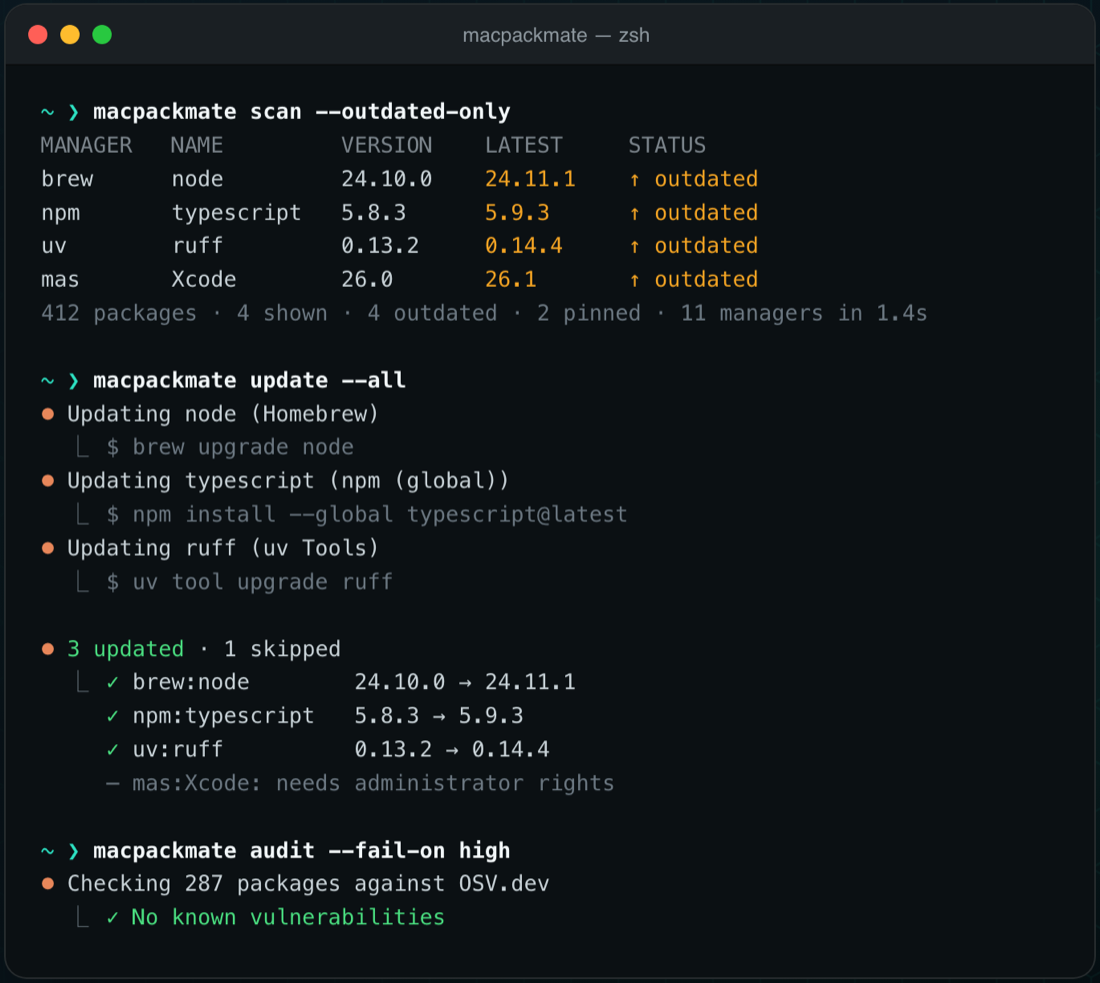
The tool lives inside the app (Contents/Helpers/macpackmate) and can be linked into your PATH with one symlink. Colourful in the style of Claude Code, 24-bit colour where available, NO_COLOR respected.
❯ ln -sf /Applications/MacPackMate.app/Contents/Helpers/macpackmate ~/.local/bin/macpackmate
doctor: brew doctor, missing dependencies, disabled formulae, manager configuration, MacPorts after a macOS upgrademacpackmate guide06 · Pricing
Download the app and try it for two weeks. If it stays, you buy it through Polar.
MacPackMate for macOS
34 €
Payment, invoice and VAT are handled by Polar (polar.sh).
MacPackMate-0.65.2.dmg · 17 MB · signed & notarized
SHA-256: b43882fa5e0c58ff79df3623e380d404fe91572ded5738ce474196f72254682a
FAQ
A native Mac app with a built-in command-line tool that unites every package manager and install source on your Mac in one list – Homebrew, MacPorts, npm, pnpm, Yarn, Bun, Deno, pip, pipx, uv, RubyGems, Cargo, Go, Composer, .NET tools, Conda, pixi, Nix, editor extensions, the Mac App Store, manual apps, installer packages, loose programs, language versions & SDKs and Docker images (25 package managers plus 5 install paths).
No. MacPackMate runs your existing package managers and brings them together. Missing managers appear faded in the sidebar – and you can have MacPackMate install them.
Yes. Homebrew and MacPorts come from their signed, Apple-notarized installers (the signature is checked before installing); all others – npm, pip, pipx, uv, Cargo, Composer, mas and Go – go through Homebrew. In the app, right-click the manager; in the terminal use macpackmate managers install. On a new Mac the import can install the managers it needs first.
Go programs (go install) and SDKMAN! versions (Java, Gradle, Maven, Kotlin …) appear in the list; Go can be updated, switched, exported and checked for vulnerabilities. Setapp apps are recognised, but Setapp updates them itself – MacPackMate leaves them alone and keeps them out of the pack file because Setapp has no command line.
You can try the app free for 14 days, after that it costs €34. It is sold through Polar (polar.sh).
macOS 14 Sonoma or later, on Apple Silicon and Intel. The app is signed with Developer ID and notarized by Apple.
No. MacPackMate collects no personal data and sends nothing to the author. Package managers talk to their own servers. The optional security check sends only names and versions to OSV.dev. The daily check for app updates loads a feed file from dynamo.at (can be switched off) – like any web request this shows the server your IP address.
No. Administrator rights come only through sudo in the terminal or the native macOS dialog in the app.
Yes. History remembers versions before and after; macpackmate rollback or the app’s rollback restores the previous version.
Yes, macpackmate is built into the app – the app is the interface on top of it. Every action of the app is also a command, with JSON output, schemas and exit codes for scripts and CI, plus the whole manual via macpackmate guide. More on the Terminal / CLI page.
25 package managers and 5 more install paths: Homebrew (formulae and casks), MacPorts, npm, pnpm, Yarn, Bun, Deno, pip, pipx, uv, RubyGems, Cargo, Go, Composer, .NET tools, Conda/Mamba, pixi, pkgx, Nix, GitHub CLI extensions, kubectl plugins (krew), Helm plugins, editor extensions (VS Code, Cursor, VSCodium, Windsurf) and the Mac App Store – plus apps, installer packages, loose programs, language versions & SDKs (nvm, fnm, Volta, pyenv, rbenv, asdf, mise, SDKMAN!) and Docker images. The list is above under “Sources”.
Yes. MacPackMate exports a Brewfile (macpackmate export --format brewfile) and imports one; on import, a Brewfile and a MacPackMate pack file are told apart by their content.
A dedicated view for LaunchAgents and LaunchDaemons: what starts at login or boot, switch on/off, remove, logs and error status – also in the terminal with macpackmate autostart.
VoiceOver, full keyboard control and Reduce Motion are supported. For this website see the accessibility statement.